TL;DR: Text-to-video AI transforms written prompts into complete videos using advanced machine learning models. In 2026, leading tools like Sora, Runway Gen-3, Pika 2.0, and Luma Dream Machine offer unprecedented quality and control. This guide covers everything from how the technology works to choosing the right tool for your needs.
What Is Text-to-Video AI?
Text-to-video AI is a generative artificial intelligence technology that converts written text descriptions into video content. Simply type a prompt like "a cinematic drone shot of mountains at sunset" and the AI generates a matching video clip within seconds or minutes.
This technology has evolved dramatically since 2024, moving from experimental demos to production-ready tools used by marketers, content creators, and filmmakers worldwide.
Why Text-to-Video AI Matters Now
The global video content market is projected to reach $1.5 trillion by 2030, yet traditional video production remains time-consuming and expensive. Text-to-video AI solves this by:
- Reducing production time from days to minutes
- Lowering costs by 70-90% compared to traditional methods
- Democratizing video creation for non-technical users
- Enabling rapid iteration and A/B testing of creative concepts
How Does Text-to-Video AI Work?
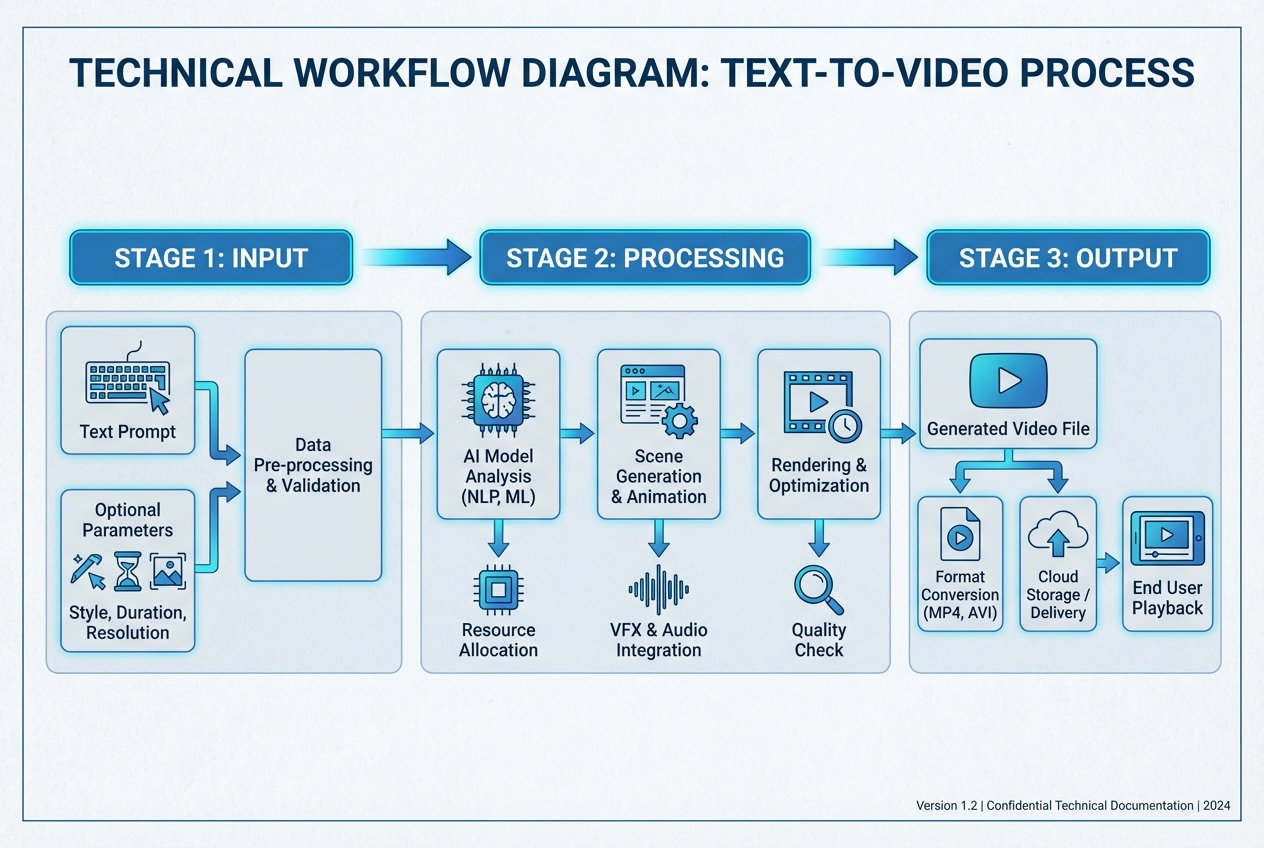
Understanding the technology helps you write better prompts and choose the right tools. Here's the breakdown:
1. Text Encoding
When you enter a prompt, the AI first converts your text into numerical representations (embeddings) using a language model (similar to how LLMs work). This captures:
- Semantic meaning
- Context and relationships
- Visual descriptors (colors, lighting, mood)
- Action and movement cues
2. Video Generation Models
The encoded text feeds into a diffusion model or transformer architecture trained on millions of video-text pairs. The model: 1. Starts with random noise (static) 1. Iteratively refines the frames based on your prompt 1. Ensures temporal consistency (smooth motion between frames) 1. Outputs coherent video (typically 5-60 seconds)
3. Key Technical Components
| Component | Function | Example |
|---|---|---|
| Text Encoder | Converts prompt to embeddings | CLIP, T5, custom LLMs |
| Diffusion Model | Generates frames from noise | Stable Video Diffusion, DiT |
| Temporal Attention | Maintains motion consistency | Space-time transformers |
| Super-Resolution | Upscales to HD/4K | Latent upscalers |
| Frame Interpolation | Smooths motion | RIFE, optical flow |
4. Post-Processing
Most tools automatically apply:
- Color grading for cinematic looks
- Audio generation (background music, sound effects)
- Upscaling to higher resolutions
- Frame rate optimization (24fps, 30fps, 60fps)
Step-by-Step: Creating Your First AI Video
Ready to try it yourself? Here's a universal workflow that works across most platforms:
Step 1: Craft Your Prompt
Bad prompt: "Make a video of a dog"
Good prompt: "Cinematic close-up of a golden retriever running through a sunlit meadow, slow motion, shallow depth of field, warm golden hour lighting, 35mm film look, smooth camera tracking"
Prompt Writing Tips
- Be specific about subject, setting, and mood
- Include camera directions (close-up, wide shot, drone view)
- Specify lighting (golden hour, neon, studio lighting)
- Mention style (cinematic, documentary, anime, realistic)
- Add motion cues (slow motion, panning, zoom)
Step 2: Choose Your Settings
Most platforms offer
- Duration: 5s, 10s, 15s, 30s, 60s
- Aspect Ratio: 16:9 (YouTube), 9:16 (TikTok/Reels), 1:1 (Instagram)
- Resolution: 720p, 1080p, 4K
- Frame Rate: 24fps (cinematic), 30fps (standard), 60fps (smooth)
- Style Presets: Realistic, Anime, 3D Render, Vintage
Step 3: Generate and Review
- Click Generate (processing takes 1-10 minutes depending on length)
- Review the output
- Use variations to explore different interpretations
- Apply inpainting or editing if needed
Step 4: Export and Use
- Download in your preferred format (MP4, MOV, WebM)
- Import into your video editor for final touches
- Add voiceover, music, or text overlays
- Publish to your channels
Best Text-to-Video AI Tools in 2026
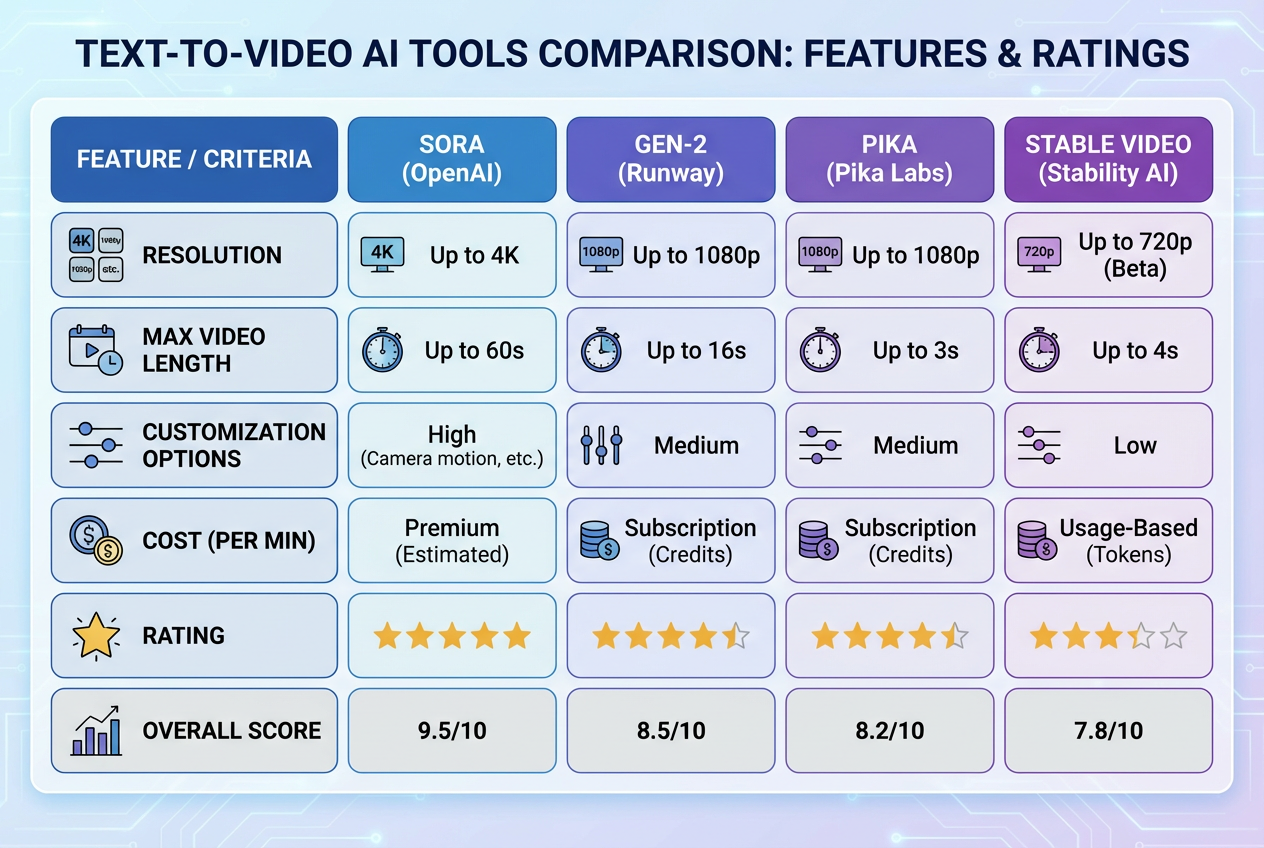
I've tested 15+ platforms. Here are the top performers across different use cases:
Overall Best: Runway Gen-3 Alpha
Best for: Professional creators, filmmakers, agencies
Strengths
- Exceptional photorealism and motion quality
- Advanced camera controls (zoom, pan, tilt)
- Multi-shot editing and scene composition
- Green screen and background removal
- 1080p and 4K export options
Limitations:
- Premium pricing ($76-150/month for pro features)
- Steeper learning curve for advanced features
- Generation limits on lower tiers
Pricing: Free tier (125 credits), Standard ($15/mo), Pro ($76/mo), Unlimited ($150/mo)
Verdict: The industry standard for professional work.
Best for Cinematic Quality: Sora (OpenAI)
Best for: High-end productions, commercial work
Strengths
- Unmatched video quality and coherence
- Complex scene understanding
- Long-form generation (up to 60 seconds)
- Accurate physics and object permanence
- Natural human motion and expressions
Limitations:
- Limited availability (waitlist/enterprise only)
- Highest cost in the market
- Strict content policies
Pricing: Enterprise pricing (contact sales, estimated $200-500/month)
Verdict: The quality leader, but access is restricted.
Best for Speed: Luma Dream Machine
Best for: Rapid prototyping, social media content
Strengths
- Lightning-fast generation (under 2 minutes)
- Free tier with generous limits
- Simple, intuitive interface
- Good quality for the speed
- API access for automation
Limitations:
- Slightly lower quality than Runway/Sora
- Limited advanced controls
- Watermark on free tier
Pricing: Free (30 videos/month), Standard ($30/mo), Pro ($100/mo)
Verdict: Best balance of speed, quality, and affordability.
Best for Creative Styles: Pika 2.0
Best for: Animated content, stylized videos, creative experiments
Strengths
- Excellent animation and cartoon styles
- Lip-sync for character dialogue
- Sound effect generation
- Creative filters and style transfer
- Active community and templates
Limitations:
- Photorealism lags behind Runway/Sora
- Shorter maximum duration (15s)
- Occasional artifacts in complex scenes
Pricing: Free (150 credits/week), Pro ($35/mo), Unlimited ($80/mo)
Verdict: The go-to for stylized and animated content.
Best Free Option: Kling AI
Best for: Beginners, hobbyists, budget-conscious creators
Strengths
- Completely free (as of 2026)
- Surprisingly good quality
- No watermarks
- 1080p export
- Active development and updates
Limitations:
- Daily generation limits
- Longer wait times during peak hours
- Fewer advanced features
- China-based (data privacy considerations)
Pricing: Free (with optional paid tiers coming)
Verdict: Best entry point for beginners.
Comparison Table
| Tool | Quality | Speed | Price | Best For |
|---|---|---|---|---|
| Runway Gen-3 | High | Medium | $$$ | Professionals |
| Sora | Very high | Limited access | $$$$ | Narrative generation |
| Luma Dream Machine | Good | Fast | $$ | Social media |
| Pika 2.0 | Good | Fast | $$ | Animation |
| Kling AI | Good | Fast | Free | Beginners |
| Haiper | Medium | Fast | $$ | Marketing |
| Stable Video | Medium | Medium | $ | Developers |
Advanced Techniques for Better Results
1. Prompt Engineering Mastery
The Formula:
[Subject] + [Action] + [Setting] + [Style] + [Camera] + [Lighting] + [Mood]
Example:
"A futuristic cyberpunk street vendor preparing neon-lit noodles in a rainy Tokyo alley, Blade Runner aesthetic, low-angle shot, neon and sodium vapor lights, mysterious atmosphere"
2. Multi-Shot Storytelling
Instead of one long video, create multiple short clips and edit them together:
- Shot 1: Establishing shot (wide view)
- Shot 2: Medium shot (action)
- Shot 3: Close-up (emotion or detail)
- Shot 4: Reaction shot
This gives you more control and higher quality than a single long generation.
3. Image-to-Video Enhancement
Start with an AI-generated image such as Midjourney or DALL-E 3, then animate it:
- Generate a high-quality base image
- Upload it to Runway or Pika as image-to-video input
- Add motion prompts such as “camera slowly zooms in”
- Use the result as a more controlled and consistent shot
4. Consistent Character Generation
For series or recurring characters:
- Use character reference images
- Maintain consistent prompt structure
- Save successful prompts as templates
- Use tools with character locking such as Runway and Pika
5. Audio Integration
Do not forget sound design:
- Use ElevenLabs for AI voiceovers
- Use Suno AI or Udio for background music
- Use AudioLDM for sound effects
- Sync everything in post-production with Premiere Pro, DaVinci Resolve, or CapCut
Common Mistakes to Avoid
Vague Prompts
"Make something cool" → Too ambiguous. Be specific.
Overcomplicating Scenes
"A city with 1000 people, cars flying, explosions, rain, sunset, and a dragon" → Start simple, then add complexity.
Ignoring Aspect Ratios
Creating 16:9 content for TikTok? You'll waste credits. Match your ratio to your platform.
Skipping Iterations
Your first generation rarely wins. Create 3-5 variations and pick the best.
Forgetting About Rights
Check licensing terms. Some tools claim ownership of generated content. For commercial work, use platforms with clear commercial licenses.
Use Cases: Who Should Use Text-to-Video AI?
Marketing Teams
- Social media ads at scale
- Product demos without filming
- A/B test multiple creative versions
- Localized content (translate prompts, regenerate) Example workflow: Generate 20 ad variations in one afternoon, test across platforms, scale winners.
Content Creators
- YouTube B-roll and intros
- TikTok/Reels content
- Thumbnail animations
- Storytelling without camera equipment Example workflow: Create a full YouTube video with AI-generated visuals, add voiceover, publish in 2 hours.
Corporate Communications
- Training videos without actors
- Internal announcements
- Explainer videos for products
- Event recaps from text notes Example workflow: Turn quarterly report highlights into an engaging video presentation.
Educators
- Visual aids for lessons
- Historical reenactments
- Scientific visualizations
- Language learning content Example workflow: Create animated historical scenes to accompany textbook chapters.
E-commerce
- Product showcase videos
- User-generated content simulation
- Seasonal campaign assets
- Personalized video messages Example workflow: Generate unique product videos for 100 SKUs in one day.
The Future of Text-to-Video AI
What's coming in the next 12-24 months: