
Last updated May 12, 2026: This draft targets "AI background remover for product photos" for ecommerce and marketplace users.
An AI background remover for product photos can clean catalog images quickly, but the final result still needs quality control. Bad edges, missing details, strange shadows, and inconsistent crops can make a store look less trustworthy.
Start with the AI image tools category and compare tools such as Remove Bg, Photoroom, Pixelcut, and Adobe on the same product set.
Key takeaways
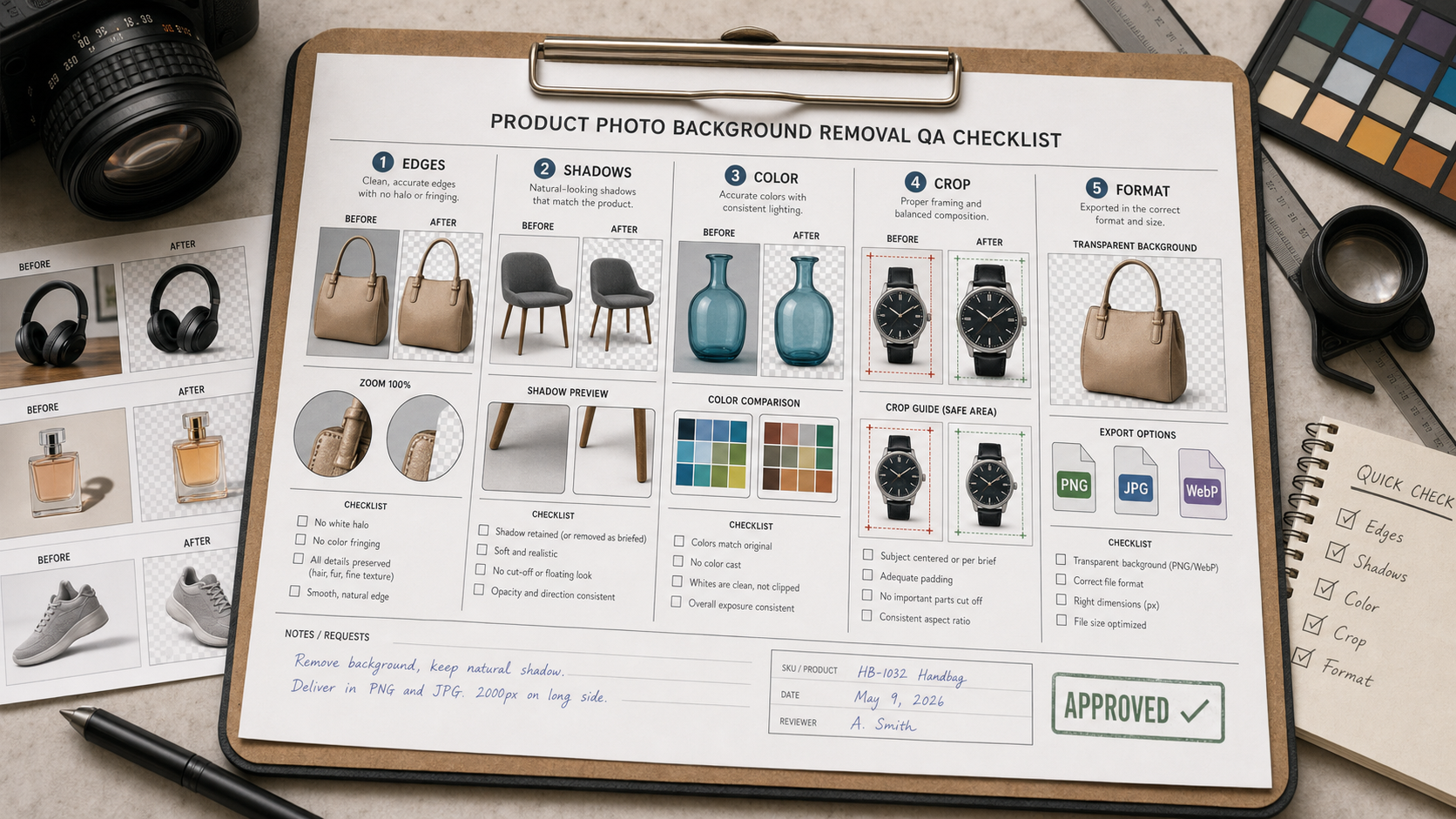
- Product photo background removal should be judged by edges, shadows, color, crop, and consistency.
- Transparent PNG output is useful, but ecommerce teams often still need a white or brand-color background.
- Batch tools save time only if they keep product scale consistent.
- Reflective, furry, transparent, and thin products need extra review.
- Always preview final images inside the actual product page layout.
What should you check after removing a product background?
| Check | Common issue | Fix |
|---|---|---|
| Edges | Jagged outlines or cut-off details. | Zoom to 200% and inspect corners, hairline parts, straps, and handles. |
| Shadows | Product floats unnaturally. | Add a soft shadow or keep the original contact shadow when accurate. |
| Color | White balance shifts after background removal. | Compare against the original product color. |
| Crop | Products appear different sizes across a grid. | Use consistent margins and canvas size. |
| Format | Wrong file type for marketplace or web. | Export PNG for transparency, JPG/WebP for final catalog images. |
Which photos are hardest for AI background removers?
Hard cases include glass, jewelry, shiny packaging, white products on white backgrounds, apparel with lace or straps, products with smoke or splashes, and objects with transparent plastic. These images may still need manual cleanup after the AI pass.
- Use clean lighting and contrast before uploading.
- Avoid backgrounds that are too close to the product color.
- Shoot from consistent angles for product sets.
- Keep one manually edited image as the visual reference.
- Review product grids, not only individual files.
Final recommendation
Use AI background removers to speed up product photo cleanup, then judge the output like merchandising work. The tool that wins is the one that creates consistent, believable product images with the least manual repair.
E-E-A-T review notes
Experience: Before publishing, test five product photo types and add examples of one easy pass and one hard correction.
Expertise: Ben Carter should keep this article focused on product photo cleanup, ecommerce image QA, background removal, and visual consistency checks.
Trust: Avoid promising marketplace approval. Image requirements vary by channel and should be checked before upload.
References
- Adobe Express background remover - official background removal feature page
- remove.bg - official product page for background removal
Where to go next
Use these internal links to continue from the article into tool comparison, product pages, and related workflows.
- AI image tools - browse image editing and generation tools
- Remove Bg - compare a dedicated background remover
- Photoroom - review ecommerce image workflow options
- Pixelcut - compare product image editing workflows