
Free AI video generators are good enough in 2026 to help creators test ideas, build short clips, and learn where a workflow breaks before paying for a full production stack. The hard part is not finding flashy demos. It is figuring out which tool actually gives you enough control, enough usable output, and enough free room to learn before you hit watermarks, queue limits, or export restrictions.
This guide turns the original tutorial draft into a cleaner decision-making article. Instead of chasing every temporary quota number, it focuses on what a reader can verify quickly: setup friction, prompt control, motion quality, export usability, and where each tool fits in a real creator workflow.
TL;DR: Veo is the best place to start if you want realism and native audio. Kling AI is strong when motion matters. Pika is still the easiest place to experiment with stylized effects. Luma Dream Machine is worth opening when you want more cinematic scene generation than playful effects. And if your job starts after generation—turning footage into explainers, commentary, or recap content—Recapo belongs in the comparison too.
How we approached this guide
This article is written from Ben Carter's AI video workflow perspective. The goal is not to crown a winner from marketing screenshots alone. It is to help readers run the same first-pass checks Ben uses when evaluating browser-based video tools for creators and operators:
- How quickly can you go from account setup to first usable clip?
- Does the tool understand camera movement, subject action, and lighting instructions?
- Can you learn something meaningful on the free tier before running into a hard wall?
- Is the export usable enough for testing, social clips, or internal prototypes?
- What still needs editing, narration, or recap tooling after the clip is generated?
That last question matters more than most roundup posts admit. A generator is not the whole workflow. Many teams still need editing, narration, commentary, or repurposing before a clip becomes publishable.
What to verify before you trust any free-tier claim
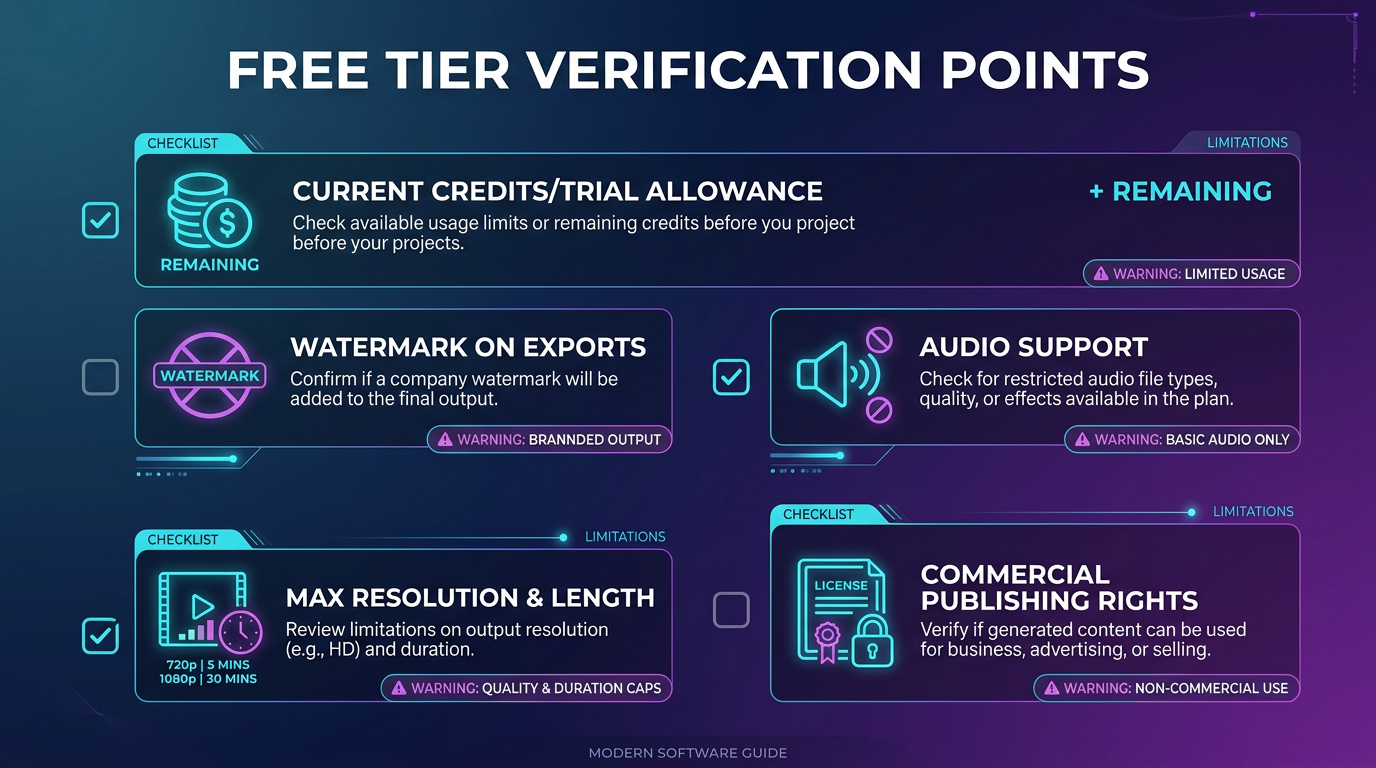
Free access rules in AI video move quickly. Credits, queue priority, watermark behavior, export limits, and commercial rights can all change between product updates. Before you commit to any tool for client or channel work, verify these points in the product UI or pricing page:
- Current free credits or trial allowance
- Whether downloaded exports include a watermark
- Maximum resolution and clip length on the free tier
- Whether audio is supported or requires a higher plan
- Whether the free plan allows commercial publishing
If you want a broader roundup of paid and trial options, see Best AI Video Generators with Free Trial: 2026 Picks. If your workflow starts from stills, the separate guide on free AI image-to-video generators is a better match.
Quick comparison: where each tool is strongest
| Tool | Best free-tier use | Main watch-out | Best fit |
|---|---|---|---|
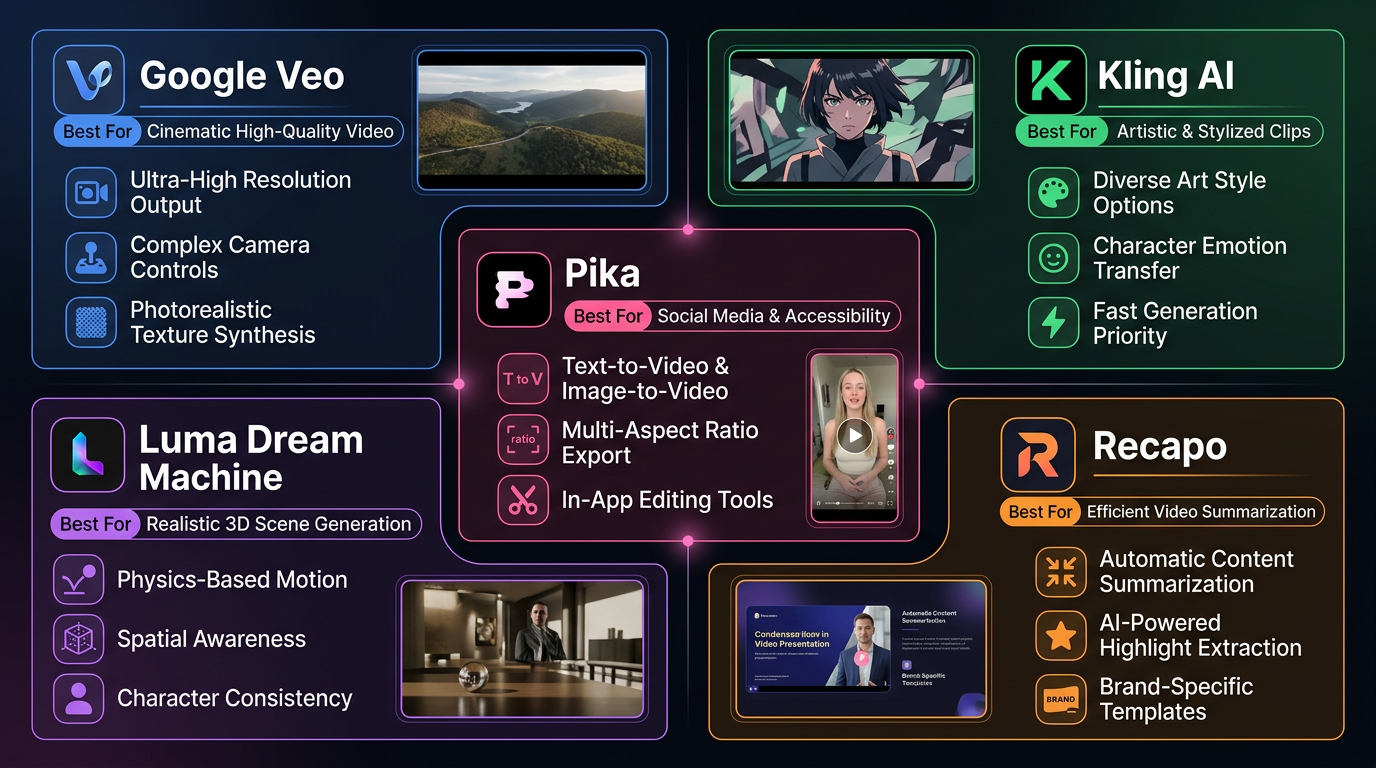
| Google Veo via AI Studio | Testing realism, prompt adherence, and native-audio workflows | Availability, quotas, and access paths can change by product rollout | Creators who want the highest-quality first test |
| Kling AI | Motion-heavy scenes and subject movement | Credit burn rises quickly when you push longer or higher-quality renders | Users comparing motion quality across tools |
| Pika | Stylized outputs, effect-driven experiments, fast creative tests | The most eye-catching result is not always the most reusable one | Creators testing social-first or effect-heavy clips |
| Luma Dream Machine | Cinematic scenes, atmosphere, and photoreal-looking environments | Free runs can disappear fast if you keep chasing higher-fidelity versions | Users who care more about visual mood than fast iteration |
| Recapo | Turning video into recap, commentary, and explainer output after generation | It is not a raw text-to-video model, so it should be judged on repurposing value | Teams who need narration, summarization, or explanation after generation |
Google Veo via AI Studio: the best first test for realism
Veo is the right starting point when your bar is realism rather than novelty. Its pitch is not just that it can make pretty clips. The more important promise is better prompt adherence, stronger physics, and native audio support in the broader Veo stack.
For a first run, use a single clear subject, a specific action, one lighting condition, and a camera direction. That is enough to judge whether the model understands your intent without hiding behind an overloaded prompt. If the clip feels believable on a clean prompt, the model is usually worth testing further.
- Start with a 16:9 cinematic scene and a short clip target.
- Describe one camera move, not three competing ones.
- Judge realism on motion consistency first, not just the opening frame.
The tradeoff is that Veo availability and routing change as Google shifts where features live. Treat product access and free allowances as moving pieces, and verify them in Google AI Studio before you promise a workflow around it.
Kling AI: the better motion test
Kling is still one of the most useful tools for readers who care about motion instead of just beauty shots. If your test prompt includes walking, running, pouring, turning, or camera follow movement, Kling is often where you see quickly whether the free tier gives you enough signal to evaluate real motion handling.
That does not make it automatically the best all-around generator. It makes it a smart comparison tool. When a workflow depends on physical movement looking plausible, Kling deserves at least one test slot in your stack.
- Use it for action-focused prompts rather than quiet talking-head scenes.
- Keep your first prompt narrow so you can tell whether the motion itself is the issue.
- Watch credit consumption carefully when testing longer runs.
Pika: the creative effects playground
Pika remains easiest to recommend when the goal is not pure realism but creative variation. If you want fast visual transformations, punchy social clips, or effect-heavy experiments, it earns its spot because it helps you discover ideas quickly.
The evaluation standard should be different here. Do not ask whether Pika beats every tool on realism. Ask whether it helps you generate visually distinctive material faster than a more cinematic but slower tool would.
- Use Pika when style and experimentation matter more than documentary-level fidelity.
- Test both text-driven and image-driven workflows if you already know your composition.
- Judge it by creative range and speed, not by whether it looks like live footage.
Luma Dream Machine: strong when the scene itself is the point
Luma works best when you care about atmosphere, scene composition, and cinematic feel. It is especially useful for environment shots, product mood clips, and visual tests where the scene needs to feel coherent rather than flashy.
In practice, that makes it a better fit for some kinds of brand and storytelling work than for quick volume testing. If you are trying to understand whether a scene can carry a mood, Luma is worth the time. If you only want cheap experimentation at scale, it may feel slower and tighter than other options.
- Use it for establishing shots, mood-heavy scenes, and controlled camera movement.
- Be selective with prompts so you do not waste limited runs chasing minor variations.
- Check export and pricing terms before treating it as a team workflow tool.
Where Recapo fits in the comparison
Recapo is not trying to replace Veo, Kling, Pika, or Luma as a base generation engine. It belongs later in the workflow.
If your question is, “Which model gives me the best raw clip from text or image prompts?” then the core comparison is between the generators above. But if your next question is, “How do I turn raw footage, long-form video, or generated scenes into something people can understand quickly?” then Recapo becomes relevant.
| Need | Best-fit layer |
|---|---|
| Create new footage from prompts | Veo, Kling AI, Pika, Luma Dream Machine |
| Turn videos into commentary-ready explainers or recaps | Recapo (official site) |
| Summarize what happened in a clip or long video before republishing | Recapo |
| Stress-test camera motion, subject action, or stylized effects | The generation models, not the recap layer |
That distinction matters because many buyers compare the wrong things. A text-to-video model should be judged on generation quality. Recapo should be judged on whether it helps you extract, explain, summarize, and repurpose video faster once footage exists. For a creator or operator shipping commentary-led content, that can be just as valuable as the generation model itself.
A simple first-run workflow that does not waste your free tier
- Pick one use case: cinematic scene, product shot, stylized social clip, or commentary-led explainer.
- Write one tight prompt with subject, action, environment, camera, and lighting.
- Run it in Veo or Kling first if realism matters, or Pika first if stylization matters more.
- Repeat the same prompt in a second tool so you are comparing output instead of comparing prompts.
- If the clip is promising, decide whether you also need editing, narration, or recap support downstream.
- If you do, evaluate whether a post-generation tool like Recapo fits your publishing workflow.
Common mistakes readers make when comparing free AI video tools
- Over-focusing on one viral sample. One good demo proves very little if you cannot repeat the result.
- Ignoring the rest of the workflow. A strong raw clip still needs narration, editing, packaging, or recap structure in many publishing environments.
- Comparing tools with different prompts. Keep the prompt stable if you want a fair test.
- Treating temporary quotas as permanent. Recheck credits, queue priority, and export terms before planning a recurring workflow.
Official references and product pages
To keep this article more trustworthy and easier to maintain, these are the primary product sources worth checking before you publish with any of the tools above:
- Google DeepMind: Veo
- Google AI Studio
- Kling AI official site
- Pika pricing
- Luma Dream Machine
- Luma pricing
- Recapo official site
Bottom line
If you want the best first free test for quality, start with Veo. If motion matters most, test Kling AI. If you want faster creative experimentation, open Pika. If you care about cinematic atmosphere, give Luma Dream Machine one serious test. And if your job is not just to generate clips but to turn video into commentary, recap, or explanation, compare that workflow with Recapo instead of pretending the generation layer is the whole stack.