
Gemini Launches a Native Mac App, Bringing Its AI Closer to the Desktop

Google has officially released a native macOS app for Gemini, giving its flagship AI assistant a proper desktop presence after a long stretch as a browser-based product. The move matters because the app does more than mirror the web version: it adds system-level access points that make Gemini easier to call up during active work, and it introduces window sharing so the model can interpret what is already on a user’s screen.
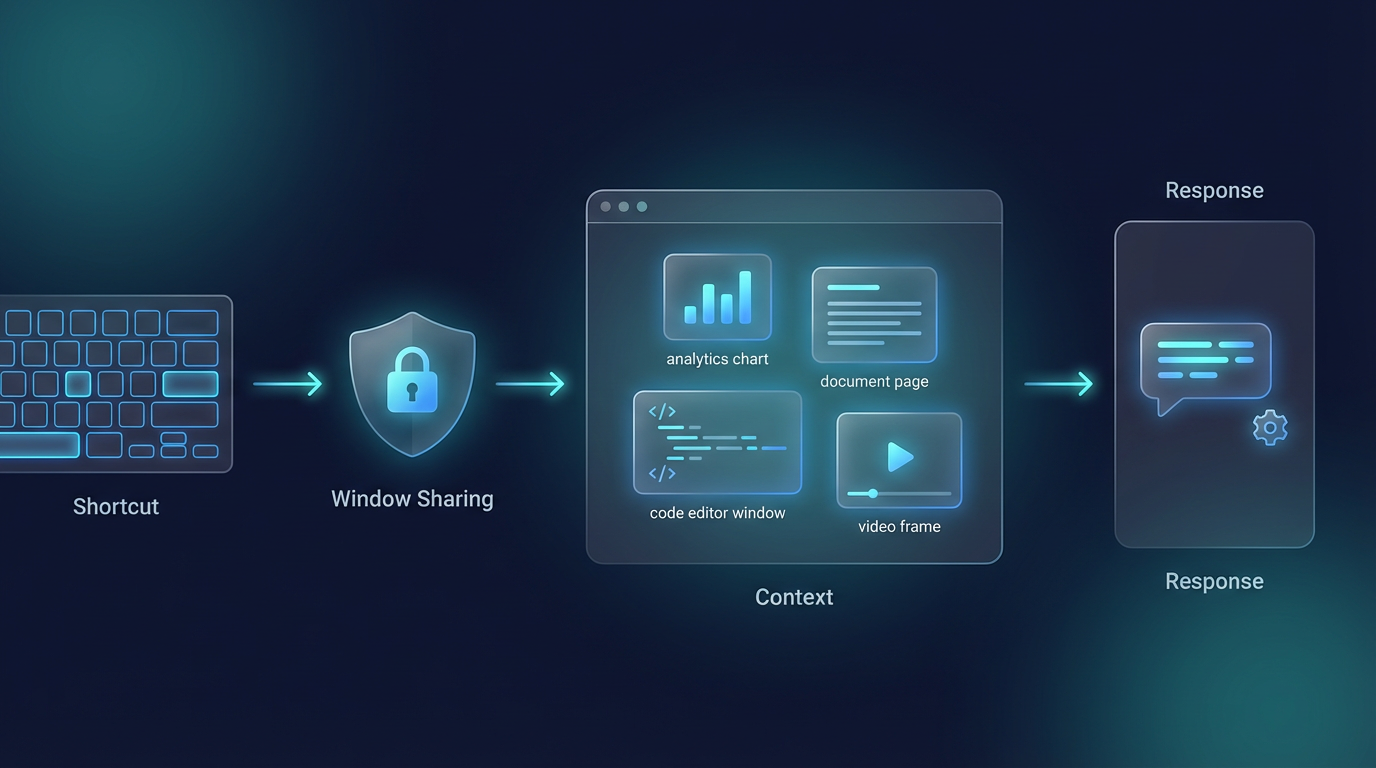
The new app supports global shortcuts, including Option + Space for a mini chat window and Option + Shift + Space for the full interface. It also lets users share the current window with Gemini after granting the required permissions. That means Gemini can respond based on a chart, document, code window, or video the user is already viewing, rather than forcing the user to manually copy context into a browser tab.
This is the key shift behind the release. For years, web-based AI assistants have been useful but awkward inside day-to-day workflows. Users have had to open a browser, find the right tab, switch into it, ask a question, then switch back. A native app reduces that friction. Instead of acting like a separate destination, Gemini can now sit closer to the desktop and be summoned as needed while someone is writing, reviewing spreadsheets, reading reports, or coding.
Google is framing the release as a true native Mac experience rather than a simple wrapper around its existing web app. Gemini product lead Josh Woodward said on X that a small team built more than 100 features in under 100 days using 100% native Swift. The statement appears designed to answer a long-running complaint: while Gemini has had strong model visibility, its desktop footprint has lagged behind rivals such as ChatGPT and Claude, both of which established Mac clients earlier.
The app also includes the familiar Gemini capabilities users already have on the web. According to Google’s launch materials, the Mac version supports all languages and countries already supported by Gemini, is available for free, syncs chats and memory across the same account, and requires macOS 15 or later as well as an Apple M-series chip.
On the surface, those may sound like incremental changes. In practice, they push Gemini closer to the center of the desktop workflow. A user can pause on a financial chart and ask for the three biggest takeaways. They can look at a block of code and ask where the likely issue is. They can open a document and request the main points. They can even ask Gemini to summarize a video that is already on screen. In each case, the burden of moving context into the model is reduced.
That matters because the competition in desktop AI has moved beyond basic chat, email drafting, and summarization. The real battle is now about proximity to the workflow: which assistant can stay nearby, understand what the user is doing, and respond with minimal interruption. By shipping a native Mac app with global shortcuts and window sharing, Google is finally putting Gemini at that table.
Still, the launch does not put Gemini fully on par with the deepest desktop AI experiences now emerging elsewhere. The current version appears strongest as a faster, more accessible, screen-aware assistant layer. It can be summoned from anywhere, it can see a shared window, and it can answer in context. But it does not yet reach the level of broader computer control that has become a major benchmark in the category.
That gap is important. The long-term promise of desktop AI is not just a floating chat box with cleaner design or better shortcuts. It is the ability to understand what is happening across multiple apps, follow a sequence of tasks, and actively execute work on the user’s behalf. In that sense, Gemini has now moved beyond the browser, but it has not yet become the kind of full computer operator that some users increasingly expect.
Google’s own messaging suggests more is coming. The company says the first release is only the beginning, with additional updates expected in the coming months. For now, the launch establishes the first two layers of the desktop AI stack: fast system-level access and contextual understanding through window sharing. The next layer—cross-app understanding and execution—still appears to be ahead.
Even so, this release closes an obvious gap in Google’s AI product lineup. Gemini is no longer confined to a browser tab on Mac. It now has a native home on the desktop, and that alone could make it more visible, more convenient, and more likely to become part of everyday work.
Related Coverage
Related AI news
AI News
Google Updates Gemini Mental Health Safety With Crisis Support and ReflexAI Training Funding
Google is updating Gemini to surface crisis-support resources and funding global hotline capacity, while emphasizing that Gemini is not a substitute for professional care.
AI News
Hermes Agent vs. OpenClaw: Why Developers Are Testing a New AI Agent Stack—And Why Most Teams Still Shouldn’t Migrate Blindly
The AI agent world moves in waves. Most of the time, a new tool rises because it is genuinely better at some painful task—better code editing, stronger tool use, cheaper inference, more stable automation....
AI News
OpenAI Privacy Filter Brings Local PII Redaction Into the AI App Stack
OpenAI released Privacy Filter, an open-weight model for detecting and masking personally identifiable information in text, giving teams a local option for safer AI data pipelines.