Editorial note, reviewed April 17, 2026: AI research tools change quickly, especially pricing, model access, and source limits. This guide emphasizes workflow fit and source discipline rather than treating any AI summary as final authority.
The best AI research tools in 2026 depend on what kind of research you actually do. A literature review tool is not the same as a web discovery engine, a source-grounded notebook, a citation checker, or an AI data analysis workspace.
For most readers, the practical stack is Perplexity for discovery, NotebookLM for source-grounded notes, Elicit or Consensus for literature review, Scite for citation context, Julius for data analysis, and Claude for synthesis and writing. You do not need all of them on day one. You need the right tool for the research stage you are stuck in.
If you are a student, start with best AI tools for students. If you want broad category discovery, browse AI research tools and AI data analysis tools.
Best AI research tools by task
| Tool | Best For | Free Access | Key Strength | Main Limitation | Choose It When |
|---|---|---|---|---|---|
| NotebookLM | Source-grounded notes | Yes, with limits | Answers tied to your materials | Weak for open discovery | You already have PDFs, docs, or links |
| Perplexity | Fast source discovery | Yes, with limits | Quick cited overview | Can encourage shallow skimming | You need a first map of a topic |
| Claude | Synthesis and drafting | Yes, with limits | Strong long-form reasoning | Not a citation database | You need memos, briefs, or structured drafts |
| Elicit | Literature review workflows | Free and paid plans vary | Paper extraction and review tables | Can be too much for casual research | You compare many studies |
| Consensus | Evidence-backed questions | Free and paid plans vary | Fast answers from scientific literature | Less complete as a workspace | You start with a focused research question |
| Scite | Citation checking | Plans vary | Shows citation context | Not a full note system | You need to verify how claims are cited |
| Julius | Data analysis | Free and paid plans vary | Natural-language spreadsheet analysis | Not a source-review tool | You work with CSVs, surveys, or charts |
| Memories.ai | Video and interview research | Plans vary | Search and summarize media archives | Too specialized for paper-first work | Your sources are recordings or transcripts |
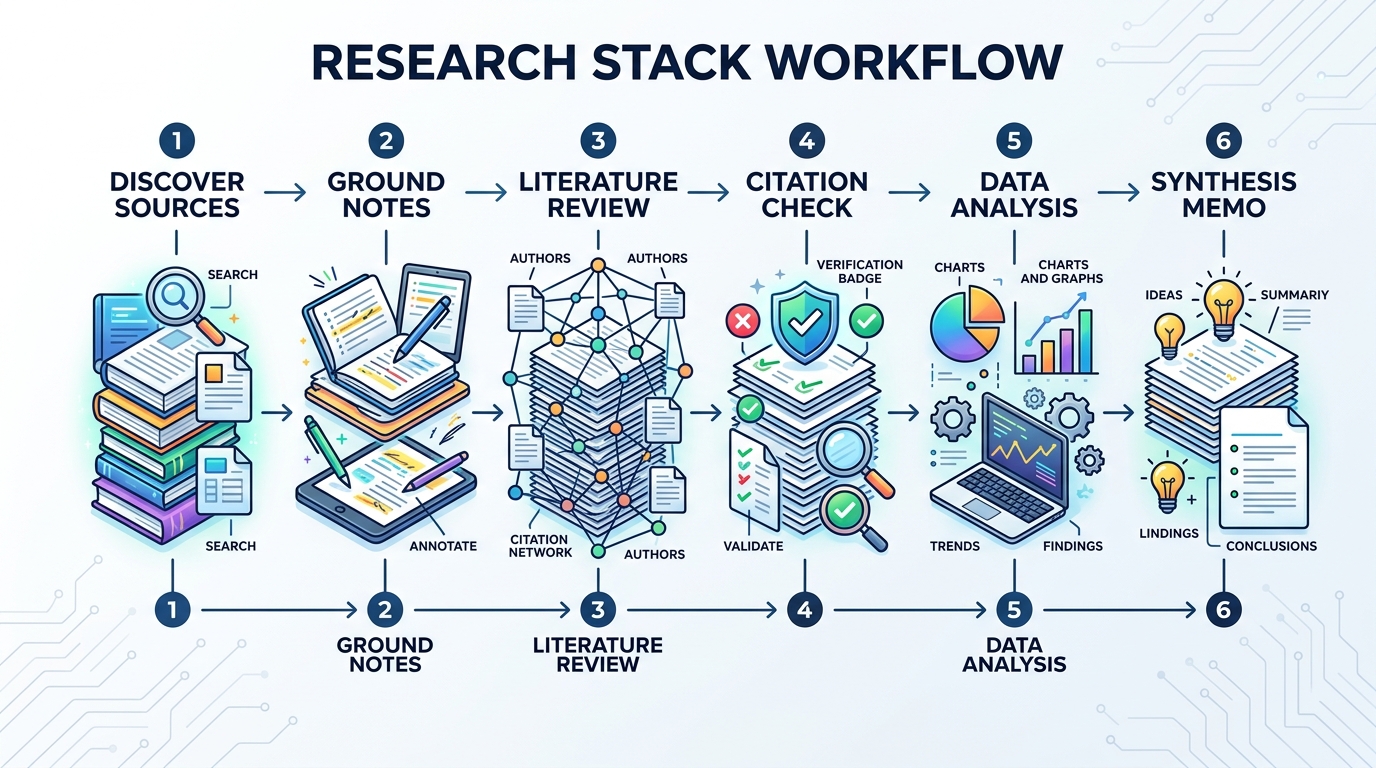
The key is sequencing. Use discovery tools to find sources, grounded tools to summarize sources, specialist tools to evaluate evidence, and writing tools to turn findings into something readable.
AI tools for literature review
If your main search is AI tools for literature review, start with Elicit, Consensus, and Scite. They are more specialized than a general chatbot and are better aligned with academic evidence work.
Elicit is useful when you need structured extraction across papers. Its value is not just summarizing; it can help build comparison tables, surface methods, and organize evidence. Use it when your research question needs repeatable review steps rather than a quick answer.
Consensus is better when your workflow begins with a focused question. It can help you find scientific evidence around a claim, which is useful for students, analysts, and content teams who need to know whether an idea is supported by research.
Scite is the caution layer. It helps you inspect citation context so you can see whether papers are being supported, contrasted, or merely mentioned. That matters because a citation count alone can make weak evidence look stronger than it is.
For academic work, these tools should support reading, not replace it. Read the key papers yourself before making a final claim.
AI source summarizer workflows
For an AI source summarizer, the main tradeoff is speed versus grounding.
Perplexity is useful when you are starting from a vague topic and need a quick map of sources, terms, people, and debates. It is a discovery layer. It can help you find what to read next, but it should not be the final authority.
NotebookLM is stronger once you already have the material. Upload papers, reports, meeting notes, or class documents, then ask questions inside that bounded source set. A good prompt is:
Based only on the uploaded sources, identify the three repeated findings, the two unresolved disagreements, and every statistic that appears in more than one source.
That “based only on the uploaded sources” instruction is not just politeness. It is the guardrail that keeps the workflow honest.
AI data analysis tools
Among AI data analysis tools, Julius is one of the clearest fits for non-coders working with spreadsheets, CSVs, surveys, and charts. General chatbots can help with analysis, but dedicated data tools usually provide a more natural workflow for uploading files, asking plain-English questions, and producing visual summaries.
A useful data-analysis prompt looks like this:
Analyze this survey CSV. Segment responses by role, surface the top three satisfaction drivers, flag statistically weak conclusions, and suggest two chart formats for an executive summary.
The phrase “flag statistically weak conclusions” matters. Research tools should not only make charts. They should also stop you from overstating weak evidence.
If your data is sensitive, check privacy and retention settings before upload. That advice is boring, but it is cheaper than cleaning up a confidentiality mistake.
AI note taking research workflow
For AI note taking research, the best tool is usually the one that preserves context over time. One-off chats are fine for quick questions, but long projects need a durable source set and repeatable notes.
A strong research workflow:
- Use Perplexity to map the topic and find candidate sources.
- Save the important papers, pages, and PDFs into NotebookLM.
- Use Elicit or Consensus to check academic evidence.
- Use Scite before repeating a claim in public.
- Use Claude to turn grounded notes into a memo, outline, or article draft.
- Use Julius if the evidence includes spreadsheets or survey exports.
This stack is slower than asking one model for an answer. It is also much safer.
Best AI research tools by user type
- Student writing a paper: NotebookLM + Consensus.
- Academic doing a literature review: Elicit + Scite.
- Market analyst: Perplexity + Claude + Julius.
- Content team: Perplexity + NotebookLM + Scite.
- Video or interview researcher: Memories.ai + Claude.
- Non-coder working with data: Julius + Claude for explanation.
If you are still building a general AI stack, our best AI tools for beginners is a gentler starting point.
Citation caution
This is the part many roundup articles skip: AI research assistants can make bad evidence feel clean.
Follow three rules:
- Use search tools for discovery, not final authority. Perplexity is helpful, but source links still need reading.
- Use source-grounded tools for synthesis. NotebookLM is safer when the answer must reflect a fixed document set.
- Check citation context before publishing. Scite is useful when you need to know whether a paper actually supports the claim.
If your research affects academic grades, client decisions, medical advice, legal claims, financial analysis, or public reporting, slow down and verify. AI can compress research, but it cannot take responsibility for your claim.
FAQ
What are the best AI research tools in 2026?
NotebookLM, Perplexity, Claude, Elicit, Consensus, Scite, Julius, and Memories.ai are useful starting points. The best option depends on whether you need discovery, literature review, source summaries, citation checking, notes, or data analysis.
Which AI tools for literature review are best?
Elicit is strong for structured review workflows. Consensus is useful for evidence-backed answers. Scite is helpful for citation context and claim checking.
What is the best AI source summarizer for PDFs and papers?
NotebookLM is a strong fit when you want summaries grounded in uploaded materials. Claude can also help synthesize long text, but you need stricter citation discipline.
Which AI data analysis tools are best for non-coders?
Julius is one of the easiest options for spreadsheet-heavy work. General AI assistants can help explain results, but dedicated data tools often handle uploads and charts more naturally.
Can AI research tools replace reading the original papers?
No. They can speed up discovery, comparison, note-making, and drafting, but they should not replace reading key sources, checking methods, or verifying citations.
Final verdict
The best AI research tools work best as a stack. Use Perplexity to discover sources, NotebookLM to stay grounded in your materials, Elicit or Consensus for literature review, Scite for citation caution, Julius for data, and Claude for synthesis. That workflow is slower than asking one chatbot, but it produces research you can defend.
Official sources checked: NotebookLM, Elicit pricing, Consensus, Scite, Julius, Perplexity, Claude pricing.